
When on your main dashboard you can select "Menu > Renew airtime" or on the main page select "Renewal Eligible"
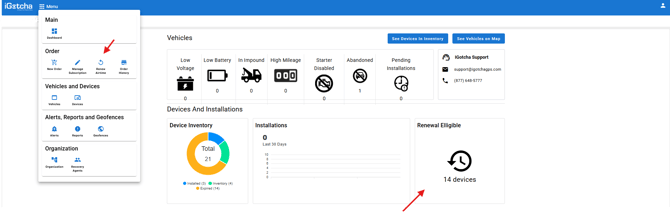
Once selected it will bring you to the screen with all the renewal able devices.
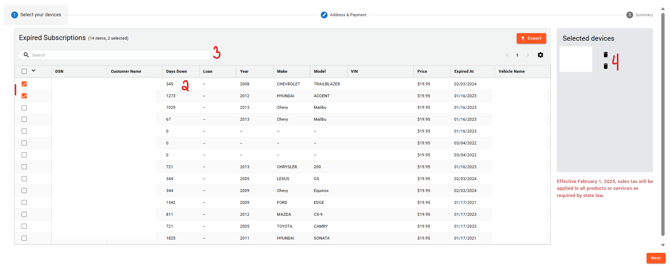
(1) You can select the device ID numbers you would like renewed on the left, multiple can be selected at one time for convenient renewals.
(2) Be sure to keep an eye on the "days down" column. This gives you the last time it connected to our application. If this is a high number, you may want to confirm with customer support that the device appears to be connected before renewing.
(3) If looking for a specific device(s) you can use the search feature at the top to locate it then select the box.
(4) You can also easily remove a device ID using the trash can icon to avoid scrolling as needed.
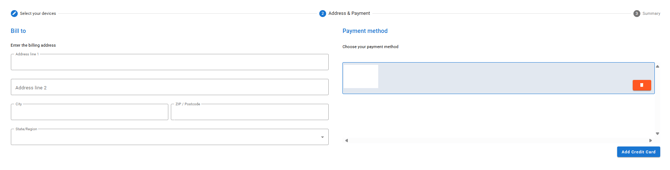
Once devices are selected hit "Next" on the bottom to confirm Credit Card and Billing address. The credit card selected will always be the default card on file but if you have multiple cards, you can select the one you want to use.
Once this is confirmed you will hit "Next" which will take you to your order summary where you can confirm the purchase for the airtime.
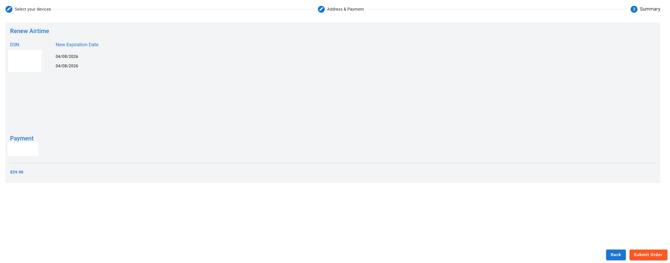
Please note: Renewing a GPS adds 1 year of service from the expired date. You can renew 90 days in advance - if renewed in advance it continues the time it has and does not restart the airtime.